Attendance across multiple locations: one version for every site
Why does every site end up with its own version?
What does one version of attendance mean?
What should head office decide, and what stays with each site?
How should each type of site clock in?
What about people who cover shifts at another location?
How do you correct a punch without breaking the single version?
Which numbers are worth comparing across sites?
Where do you start?
How Workforce helps
Frequently asked questions.
Related articles
Spreadsheets vs. a time clock: when manual tracking stops working
How to close the pay period without chasing timesheets
See it on your own operation.
Platform
Solutions
Industries
Company
Enigma Workforce for growing teams: time, schedules, and projects in one place, with support in English. See the platform
Organize
Track
Manage
Improve
Attendance
Operations
Administration
Not sure where to start?
Resources · Operations
One version of attendance takes rules written down in one place, one owner at each site, and a single system where every punch lands, whatever method each location uses to clock in.
November 16, 2026 · 5 min read · Enigma Workforce team
Key takeaways
One version means the same question gets the same answer for HR, operations, and leadership.
The company decides what has to be comparable; each site decides what only the site knows.
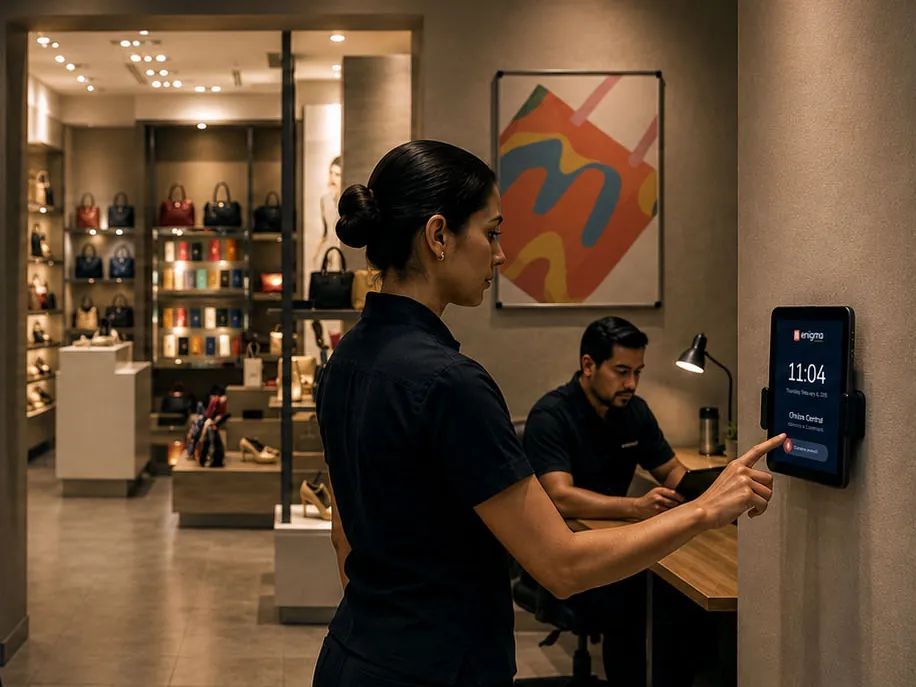
Tablet, entrance kiosk, or phone: each site clocks in its own way, and every punch lands in one place.
Someone who covers a shift at another location still exists once in the system.
To get one version of attendance across several locations you need three things: rules written down in one place, one owner at each site, and a single system where every punch lands. Without them, each site keeps its own count, and HR ends up assembling one company out of several versions of the data.
Because each supervisor solves the problem with what's at hand. One site uses a paper sign-in sheet, another has a punch clock whose data nobody downloads, and a third sends a photo by text message. It isn't bad faith. It's the lack of a shared method.
The same thing happens with rules. One store allows a ten-minute grace period and another allows none, so “late” means different things depending on where you work. You can't compare sites, and you can't explain to an employee why their case was handled differently.
It means the same question gets the same answer no matter who you ask. If you ask how many people showed up at the north store today, HR, the regional manager, and the store supervisor all see the same number.
There's a simple test: ask three different people for yesterday's attendance. If you get three files with three totals, you have three versions.
It doesn't mean every site has to run the same way. Each location can keep its own schedules, and even its own rules, as long as they're written in the same system and everyone can see which ones apply.
A practical rule: the company decides what has to be comparable, and the site decides what only the site knows.
Head office: the list of people, positions, and shifts; what counts as late or absent; who can correct a punch; the cutoff dates.
Each site: local schedules, who covers for whom, and approval of the day's exceptions.
When head office wants to approve everything, it approves without knowing. When each site sets its own rules without telling anyone, nobody can add the numbers up.
In whatever way suits the work, as long as everything lands in the same place. Not every site needs the same method:
Store or office: a tablet at the entrance, used as a kiosk.
Plant or warehouse: a clock-in point at each entrance.
Field staff and people who move between sites: their phone, with location.
Before you collect face or location data from employees, ask your advisor what you need to tell them and what consent applies where you operate.
This is where a single version usually breaks. Someone belongs to one site, covers at another, and their hours show up twice or not at all.
The fix is that each person exists once in the system, and every punch keeps where it was made. The hours count for the person who worked them, and the coverage shows at the site where it happened.
With one rule for the whole company: the correction is requested or approved by the person who knows the case, and it's recorded with its author and its reason. What shouldn't happen is each site fixing things in its own file.
A missed clock-out is an everyday example. If the supervisor corrects it the same day, it's routine. If it's found at the cutoff, it's an investigation.
A few, always measured the same way: punctuality, absences, overtime, and exceptions waiting for approval. That's enough to know where to look first.
Read the numbers with care. A site with a lot of overtime may be short-staffed, not undisciplined. A number tells you where to ask, not what to conclude.
By finding out how each site works today. With that map in hand, the rest falls into four steps:
Take inventory: how does each site record attendance?
Write down the shared definitions and each site's exceptions.
Name one attendance owner per site.
Begin with two or three sites that differ from each other, and adjust before you roll it out to the rest.
You don't get one version by watching your sites more closely. You get it by taking away the job of keeping their own count.
In Enigma Workforce, head office, branches, and remote sites live in one structure, with their departments, positions, shifts, and people. You define them once in My Organization , and every module uses them.
Attendance from every site comes into one view, with rules by location and supervisors by site. Insights show attendance, absences, and overtime by location, area, or shift, so you compare with the same measure.
Moving off shared files first? Read spreadsheets vs. a time clock . To see it with your own locations, book a demo .
Questions
Not necessarily. Employees can clock in from a tablet at the entrance or from their own phone. What matters is that every punch lands in the same place.
Yes. One version doesn't mean every site runs the same way. Each site keeps its schedules and rules, as long as they're written in the same system and everyone can see which ones apply.
The site supervisor, who knows what happened, with the change recorded under their name. Nobody should be able to edit a punch without leaving a record.
Keep reading
Attendance · 5 min read
A spreadsheet works while one person tracks a small team in one place. Add shifts, locations, overtime, or field staff, and it only records what someone had time to type in.
Read article
Payroll prep · 5 min read
A pay period closes on time when hours and exceptions are approved during the period, not on the last day. Five habits and a weekly review get approved hours ready before the cutoff.
Read article
In the demo we use your shifts, your locations, and your pay periods.
Enigma Workforce is the modular workforce ecosystem that connects your organization, attendance, projects, payroll prep, records, and insights. Part of EnigmaSuite .
My Organization
Time Clock
Projects
Payroll prep
Employee Portal
Employee Records
Insights
Talent and Development
Integrations
Time and attendance
Digital time clock
Biometric time clock
Field teams
Shift scheduling
Payroll prep
Manufacturing
Logistics
Retail
Construction
Services
Companies with an ERP
Book a demo
Pricing
Resources
Customer sign-in
Privacy notice
Trust center
Español
English


 See the platform
https://enigmaworkforce.com/workforce/en
Time and attendance
Tell us what you need to solve We'll show you the modules that fit your operation. Book a demo
Manufacturing Rotating shifts and plant staff.
Pricing
Resources
ES
spreadsheets vs. a time clock
Payroll prep · 5 min read How to close the pay period without chasing timesheets A pay period closes on time when hours and exceptions are approved during the period, not on the last day. Five habits and a weekly review get approved hours ready before the cutoff. Read article
EnigmaSuite
Customer sign-in
Privacy notice
Trust center